Connect your FedEx account to Zonos
Connecting your FedEx account now uses the FedEx REST API with multi-factor authentication (MFA) for secure account verification.
For full step-by-step instructions, see the FedEx account connection guide.
Shipping settings
-
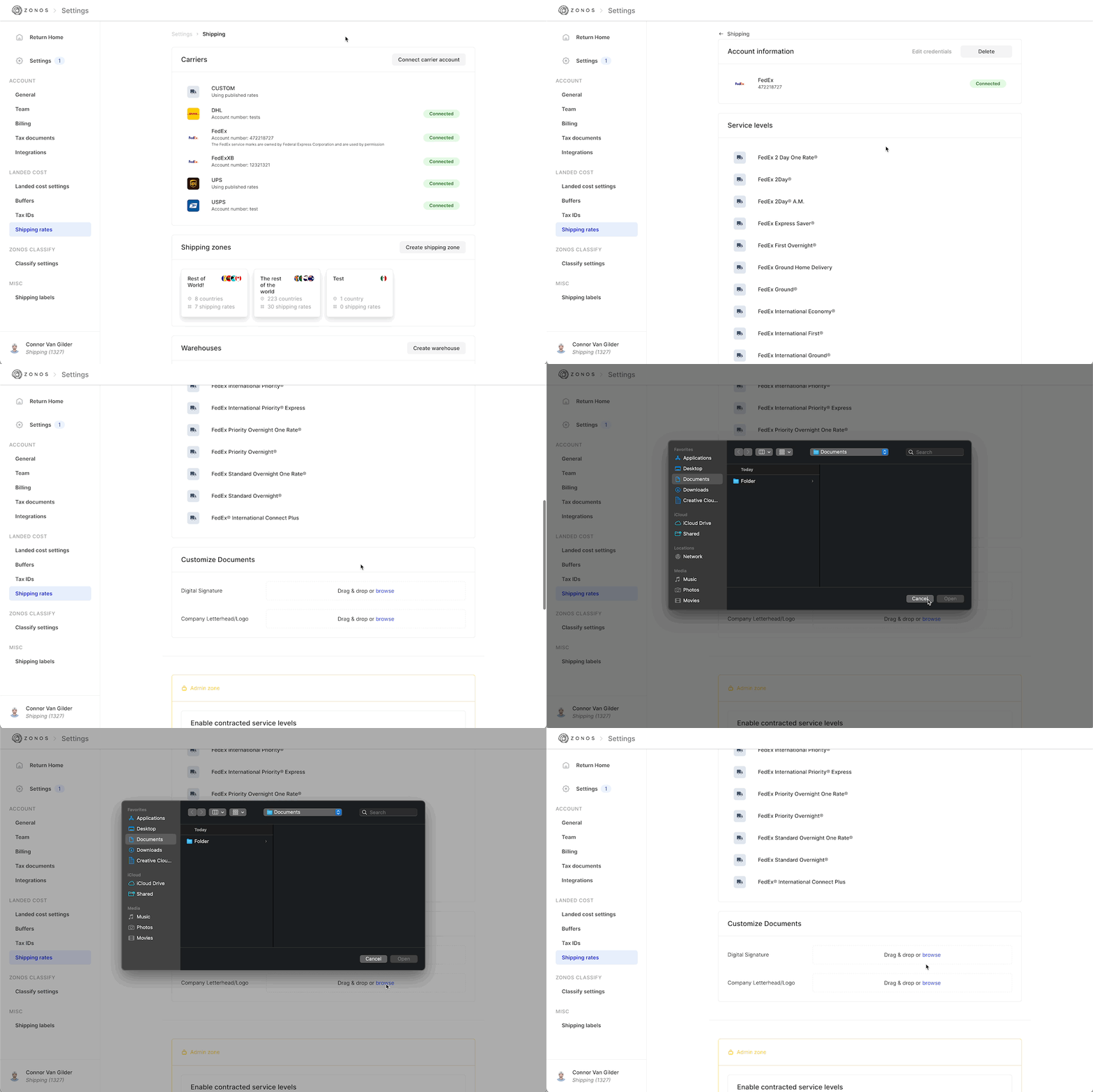
You can upload files for digital signatures and logos that will appear on FedEx Commercial Invoices. Follow the size limitations set by FedEx of these signatures and logos:
- Digital signature: The size limitation is 240x25 pixels. Images must be in GIF or PNG format.
- Company letterhead/logo: The size limitation is 700x50 pixels. Images must be in GIF or PNG format.
Create a shipping label
-
Specify a label size and format using either the PDF or ZPL format, and then choose either 4X6 or 4X8 for your size. If you change this setting at any time, it will persist for all future labels.
-
If using FedEx Home Delivery service levels, specify the home delivery type and details, selecting from:
- FedEx Date Certain Home Delivery®
- FedEx Appointment Home Delivery®
- FedEx Evening Home Delivery®
-
Specify the following information as it relates to the shipment:
-
Signature requirements
- Default
- Adult required
- Direct required
- Indirect
-
Alcohol content
-
Select the license type
- Consumer
- Licensee
-
-
Lithium battery content
-
Battery type
- Lithium-ion
- Lithium metal
-
Packaging
- With item
- In item
-
-
Saturday delivery
-
Inside delivery
-
FedEx ShipAlert (allows customers to receive updates about the shipment from FedEx)
-
Users can currently only select one notification type
- Delivery
- Estimated delivery
- Exception
- Pick up
-
-
If an item is shipping in a non-standard container (applies to items like tires, etc.)
-
FedEx box sizes are available as options for customers to select. However, customers will still need to update the weights and dimensions of these packages
- When using International Economy Freight or International Priority Freight, additional freight-specific packaging options will be available and required for use
-
The Electronic Export Information (EEI) will accept ITN numbers (U.S. export) and Proof of Report (POR) number (CA Export) based on the origin and destination of the shipment
-
Select FedEx Ground Collect for the following circumstances only if the recipient has been authorized for Ground Collect shipments via their FedEx account:
-
Shipment is commercial
-
Shipment uses a ground service level
-
Broker Select is being used
-
Use FedEx Ground Collect with the following:
-
-
Freight class can be added for select FedEx shipments:
- FedEx Freight Economy
- FedEx Freight Priority
- These shipments will auto-generate a BOL (bill of lading)
-
Add freight booking numbers for any of the following types of FedEx shipments:
- International Economy Freight
- International Priority Freight
- To book a freight shipment and obtain a booking number, call 1.800.332.0807. This booking number should be included in the shipment request to be reflected on the shipping label
- If you are a customer with daily FedEx pickups, you are not required to get a booking number but will still be required to pass a dummy value in the label request.
-
Upload documentation to FedEx for customs clearance
In the event that you need to upload documentation that will allow shipments to clear customs, you can use the Upload customs data section of the Create label flow. Within this section, you can choose from the following document types:
- Commercial invoice
- Certificate of origin
- USMCA commercial invoice certification of origin
- USMCA certification of origin
- Pro forma invoice
- Other
Other can be used for any document that does not fit the types above. An example of this would be a phytosanitary certificate for plant shipments going to a particular country.
Supported FedEx service levels
Zonos supports the following FedEx services for shipment rating and label generation.
Domestic:
- FedEx Ground®
- FedEx® Extra Hours
- FedEx Ground® Economy
- FedEx Ground® Economy (under 1 lb.)
International:
- FedEx International Ground®
- FedEx® International Connect Plus
- FedEx International Priority® Express
- FedEx International Priority®
- FedEx First Overnight® Freight
- FedEx 2 Day One Rate®
- FedEx Priority Overnight®
- FedEx Freight® Economy
- FedEx Freight® Priority
- FedEx Standard Overnight®
- FedEx International Economy® Freight
- FedEx International Priority® Freight
- FedEx Standard Overnight One Rate®
- FedEx Priority Overnight One Rate®
- FedEx 1Day® Freight
- FedEx 2Day® Freight
- FedEx 3Day® Freight
Note: Note that some service levels, such as FICP, are contracted only and must be assigned to your account via your FedEx account manager. If your account does not have access, the service will fail on our side.
FedEx Compatible Solutions Program
Learn about Zonos-supported FedEx servicesAs part of the FedEx Compatible Solutions Program, Zonos has implemented new features to give FedEx retailers an enhanced cross-border shipping experience.
Participation in the FedEx Compatible Solutions Program program greatly benefits FedEx retailers using Zonos. When you connect your FedEx account to Dashboard, you will automatically be able to start transacting with Zonos immediately.